Your Roadmap turns the route you chose on Career Paths into milestones, from where you are to your goal, each with a step-by-step guide you tick off. You set the pace. The Roadmap is part of Plus and up. The pictures show a sample account with made-up details.
Try the Roadmap in the demoBefore you start
Choose a route on Career Paths first. Your roadmap appears under Roadmap in the menu, for the kit you're working on.
Read your roadmap
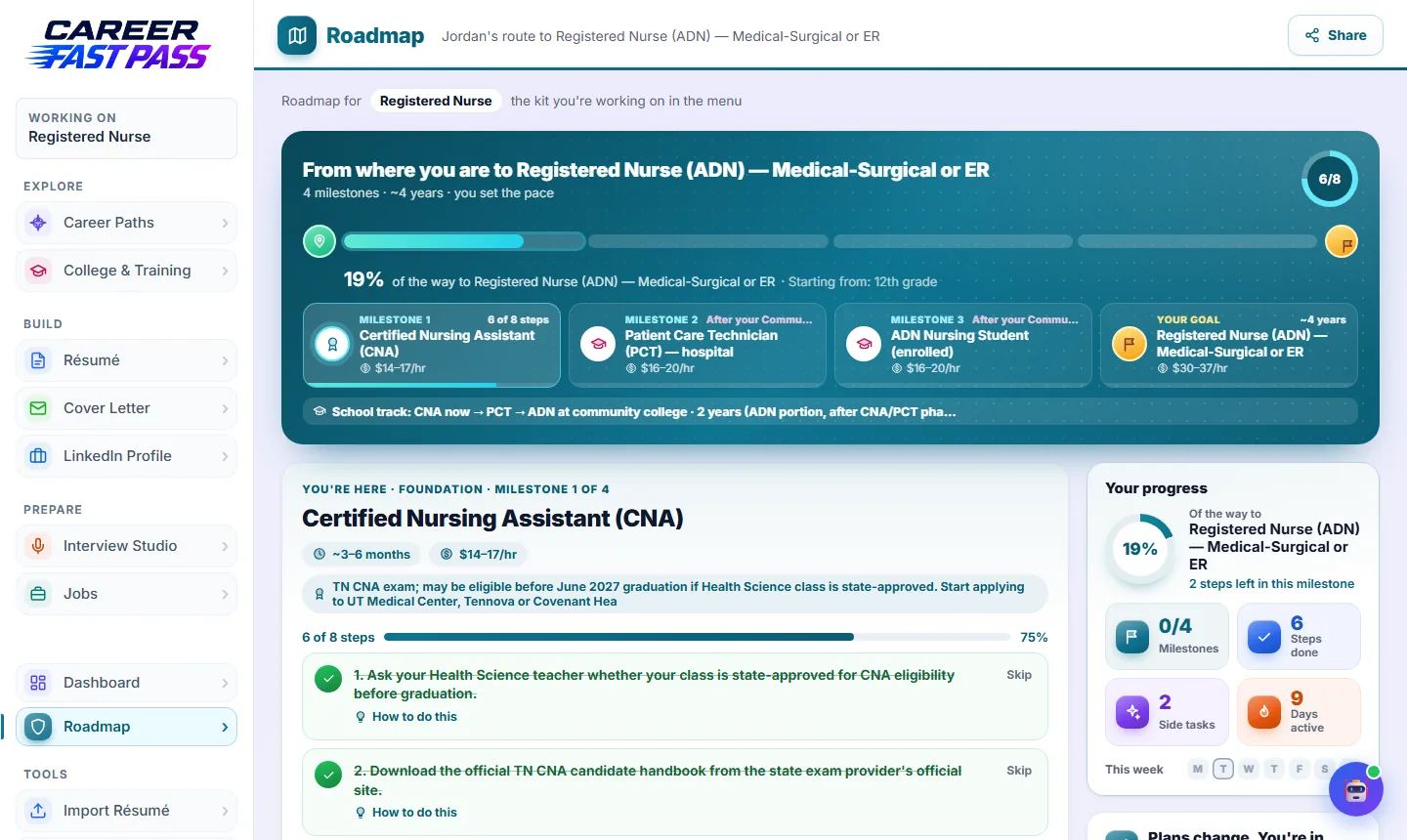
- The top shows how far along you are, the milestones ahead, roughly how long it takes, and the pay at each stage.
- The milestone marked You're here is the one you're working on. Click any milestone to read about it.
- Milestones marked with a cap wait on school; your school plan comes from College & Training.
Work through a milestone
- On the milestone you're on, press Build my step-by-step guide. You get 6 to 8 small steps. Guides are written when you reach a milestone, so they fit what you've done by then.
- Open How to do this under a step for exactly how to do it.
- Tick a step when it's done. Skip a step that doesn't apply (Undo brings it back).
- Add your own step for anything else you want to track.
Finish a milestone
- Press I've finished this milestone. You decide when it's done.
- Career Fast Pass offers to add what you achieved to your résumé. You see the change first, and nothing changes unless you say so.
- The next milestone becomes "You're here".
Side tasks and summer
- Go further (or While you're in school) has optional side tasks that build skills and experience. They never hold up your roadmap.
- Choose how much to take on: Essentials, A bit extra or All in. Switch any time; nothing is lost.
- Add your own side tasks, and turn a finished one into a win for your portfolio with Add as a win.
- Make your summer count suggests one or two summer ideas. Add them or choose Not this summer.
Change your plan
- Change my goal: aiming somewhere new? Finished milestones stay, and the ones ahead are rebuilt toward the new goal.
- Choose a different path: other careers that fit your skills and progress. Your history is kept.
- Life happened: moved, a new schedule, money changed? Tell us and your steps are adjusted to fit.
- Or pick another route on Career Paths.
Share your roadmap
Share makes a link to a read-only copy of your roadmap, for a parent, mentor or counselor. You can turn the link off any time, and it stops working.
What each plan includes
| Plan | Roadmap |
|---|---|
| Free and Starter | A preview. The Roadmap is part of Plus. |
| Plus | Your roadmap, step-by-step guides, side tasks and sharing; 20 goal changes, new paths or "life happened" updates a month. |
| Pro and School | The same, with 40 of those updates a month. |
If something isn't working
- "No roadmap for this kit yet."
- Pick a route on Career Paths for this kit. Or open a roadmap you already have from the list on that page.
- "This guide names websites or prices that can go out of date."
- Press Rewrite my guide to get a fresh one.
- "You've used this month's AI roadmap changes."
- They reset on the 1st. Ticking steps and adding your own still works.