Career Paths shows three realistic ways to grow from where you are now: a quick win, a balanced route, and a route with a higher ceiling. Each route is a set of steps (roles), with the time, estimated pay and training for each. When you choose one, it becomes your Roadmap. Career Paths is part of Plus and up. The pictures show a sample account with made-up details.
Try Career Paths in the demoRead your three routes
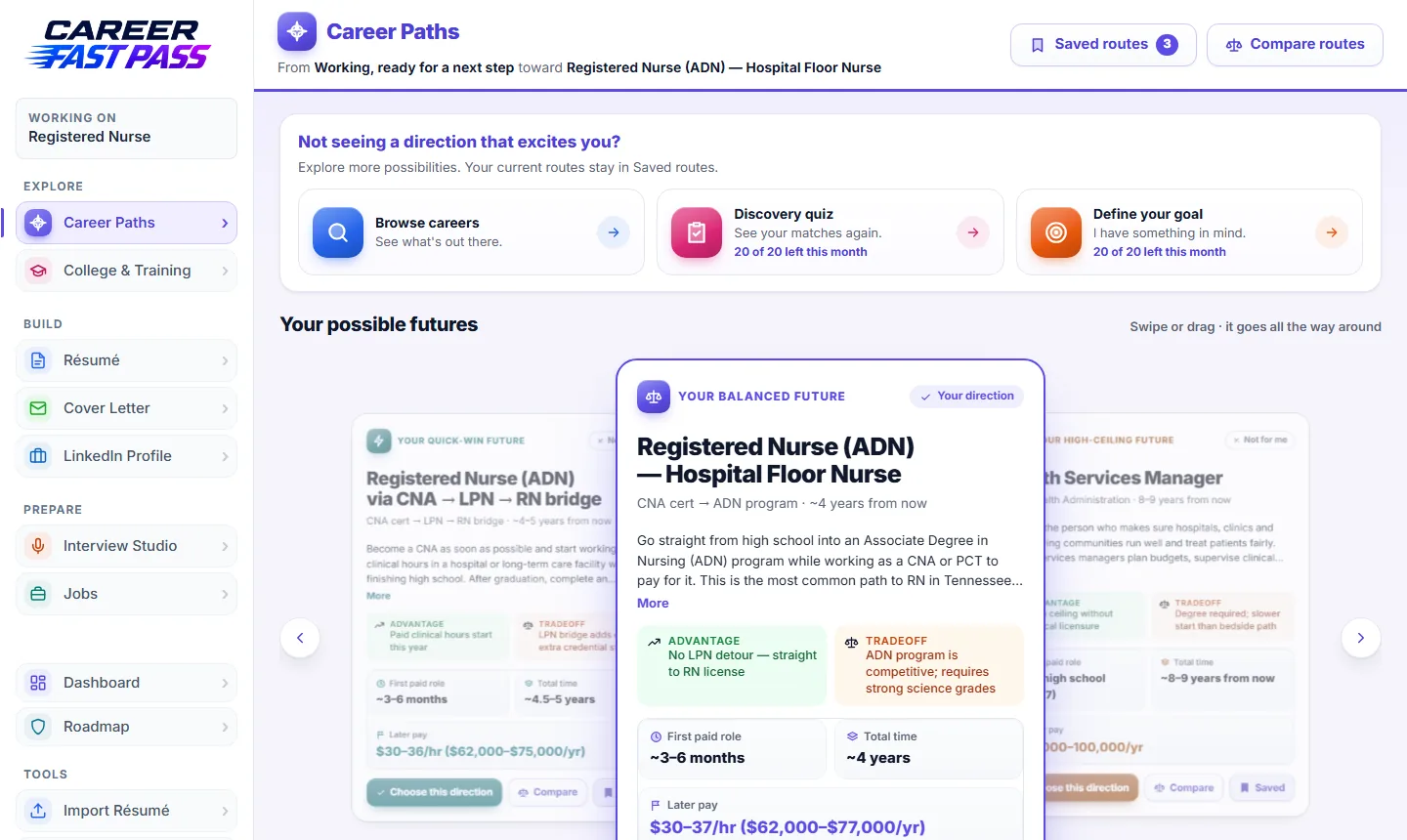
- Open Career Paths in the menu. Your routes are built from your kit, so they start from your real experience.
- Move between the three routes with the arrows, or by swiping or dragging.
- Each route shows its first paid step, the total time and the pay at the end, its biggest advantage and its tradeoff, and why it fits you.
- Open a route to read it chapter by chapter: each role, how long it usually takes, estimated pay, and the training or credential it needs.
- Look for shortcuts: ways to reach the goal sooner, such as a certificate or a role that skips a step. You can choose a route with a shortcut built in.
Pay figures are estimates, and education needs are typical for each role, not rules. Check them against job postings near you.
Choose a route
- When one route fits, press Choose this direction.
- Career Fast Pass builds your Roadmap from it: milestones from where you are to the goal.
- Changed your mind? Choose another route any time. Your other routes stay in Saved routes.
If the route you choose leads to a different job than your kit is aimed at, Career Paths asks whether to start a new kit for that job or keep this kit as it is.
Not for me, compare and save
- Why this fits explains, in a sentence or two, what in your answers led to that route.
- Not for me (on a route that isn't your direction) swaps just that one route. Pick what's wrong with it (pay too low, takes too long, too much school, not the work you want, not near you, or something else), add a note if you like, and press Swap this route. The other two routes stay. A bar then offers Undo (bring the old route back) or Keep it.
- Save on a route keeps it in Saved routes (up to 20 per kit). Routes that get replaced are also kept for you under Earlier routes (the last 12), so nothing you liked disappears.
- Saved routes (at the top of the page) lists both. Bring back puts a route back into the same slot, and Remove deletes one you don't need.
- Compare routes puts routes side by side: time, cost, the work itself and the tradeoffs.
- See the full career page, on a route's destination when we have a page for it, opens that career's page with pay and training from the U.S. Department of Labor.
Explore other directions
Not seeing a direction that excites you? Open Explore more possibilities:
- Browse careers: real careers with pay and training. Choose one to build routes toward it.
- Define your goal: type a goal of your own, and Career Paths builds three routes toward it.
- Discovery quiz: see below.
Your current routes stay in Saved routes while you explore.
The Discovery quiz
The quiz uses the U.S. Department of Labor's career interest questions (O*NET), plus a few questions of our own. Every part can be skipped, and your answers are saved if you close it and come back.
- Part 1, what you like doing: 30 short activities, one at a time, each from "Strongly dislike" to "Strongly like". There's a check-in halfway. This part gives the best matches, so it's worth finishing.
- Part 2, what matters: up to 3 things that matter most in work, how much more training you're up for, what matters most in 10 years, and anything you'd rather avoid.
- Part 3, "Is this you?": a short summary of what the quiz picked up about you. Answer Yes, Mostly (and add what's missing) or Not really (and say what's off), with optional questions in your own words.
- Your results: your interest profile in plain words, then up to 12 matching careers with U.S. median pay, how much preparation each usually needs and a Bright outlook tag where the Department of Labor expects fast growth or many openings. Filter by Fits my training or Bright outlook. Ideas you might not have considered are 2 or 3 ideas drawn from your own words, with a rough pay estimate.
- On any match, Swap into my routes replaces one route you pick, and Build 3 routes replaces all three. Your results are saved with the kit, so you can come back to them without retaking. Retake starts fresh.
What each plan includes
| Plan | Career Paths |
|---|---|
| Free and Starter | A preview of what Career Paths does. Choosing and building routes is part of Plus. |
| Plus | Your three routes, chapters, shortcuts, compare and saved routes; each month, 10 new goals, 10 Discovery quizzes and 10 route swaps. |
| Pro and School | The same, with 20 of each a month. |
Tips for choosing
- Need income soon? The quick-win route usually gets you paid fastest.
- Look at the first step, not just the goal. Can you start it in the next few months?
- Talk to someone in the job before you commit to a long route.
- It's not permanent. You can change direction later, and your progress is kept.
If something isn't working
- "Choosing a direction is part of Plus."
- Career Paths needs Plus or above. See Pricing.
- "Couldn't build paths for that. Try different wording."
- Use a plain job title, like "dental hygienist" or "electrician".
- I've used this month's new goals.
- They reset on the 1st. Your routes and Saved routes keep working.
- "You've used this month's swaps."
- Route swaps reset on the 1st. You can still bring back a saved route, or build three new routes from a goal if you have goals left.
- "You can save up to 20 routes."
- Open Saved routes and remove one you don't need first.
- "You've used all 10 discovery quizzes for this month." (20 on Pro and School)
- They reset on the 1st. Results you already have stay saved with your kit.